Lets Automate It

from Josh Rickard

Download Files From Github Without Git Using Powershell

2018-08-07 Josh Rickard

Have you ever needed to download code or a repository from Github, but didn’t want to download and install Git on a machine, create an SSH key, etc. If so, I have something that you may like.

You can find the entire function here: https://github.com/MSAdministrator/GetGithubRepository

To use this function, you will need to know the path to the Github repository (of course) you want to download.  Once you have that URL, you will need to pass each piece of the URL into a parameter on the function.

Continue reading

Design Before Coding Kanban

2018-08-07 Josh Rickard

The first post in this three-part series focused on gathering requirements before spending time coding.  While it is not necessary, I recommend that everyone read part 1 (Gathering Requirements).  Understanding and having clear “User Stories” outlining the intended purpose of a tool is crucial, especially as we move towards building our new tool.

Once our “User Stories” have been defined and agreed upon by all stakeholders, we then need to begin breaking them down into tasks.  There are many different methodologies that allow us to track these different tasks. Part 2 of this three-part series will focus on one of them; Kanban.

Continue reading

Design Before Coding Gathering Requirements

2018-08-07 Josh Rickard

If you have worked in IT for any duration, I’m sure you have overheard or been asked to build a tool to complete X or Y. Creating tools with PowerShell is fun, but it can become daunting when you create a tool that does not meet its intended purpose.  Without understanding the full requirements, you may waste time and energy on developing a tool that no one will use.

Creating tools with PowerShell to automate a manual process or to help an internal stakeholder accomplish a desired result, typically does not need to turn into a large initiative with a Project Manager or Project Management Office (PMO). Being tasked with creating these tools usually comes in the form a short conversation or through an email.  Out of habit, we usually dive right into writing a script or function to solve the problem.  This approach can cause a lot of re-work or redesign of our tool once complete.  Even though we believe we understand all the requirements, it is better to have the stakeholder create a “Goal Statement” that defines the intended purpose of the tool.  The “Goal Statement” helps everyone involved understand when the initiative is done.

Continue reading

How I Work

2018-08-07 Josh Rickard

I recently saw this project shared by Adam Bertram, and decided that some of you may be interested in how I work on a day to day.

https://github.com/adbertram/HowIWorkIT/blob/master/README.md

If you’re not interested, well then why the hell are you here?  You can see others that have participated here: https://github.com/adbertram/HowIWorkIT/blob/master/ThisIsHowIWork.md


Where are you located?

First of all, my name is Josh Rickard and I'm located in Columbia, Missouri.  It sounds lame, but really it's a great little town.  The population of Columbia is around 100, 000 (without students).  With that being said, we have about 5 College's/Universities, so our population increases quite a bit when students are in town.

What is/are your current gig(s):

I currently work at home for PhishMe; if you're not familiar, then check us out: http://phishme.com/.  My position at PhishMe is currently "Manager, Reporter Solutions Engineering".  I'm a new manager, but we do anything and everything to do with PhishMe Reporter products (email client plugin/add-in to reporter suspicious messages).  When I say everything, I mean everything from customer engagement, support, troubleshooting, development, etc.

What’s one word to describe your work?

Continue reading

Powershell Qualys Get Asset Group Info Part 2

2018-08-07 Josh Rickard

Today I decided to write another post regarding PowerShell and Qualys Vulnerability Management API.  This post will focus on gathering information about your enrolled Asset Groups.   You can find the complete script on GitHub: https://github.com/MSAdministrator/POSH-Guard/blob/master/Get-QualysAssetGroupInformation

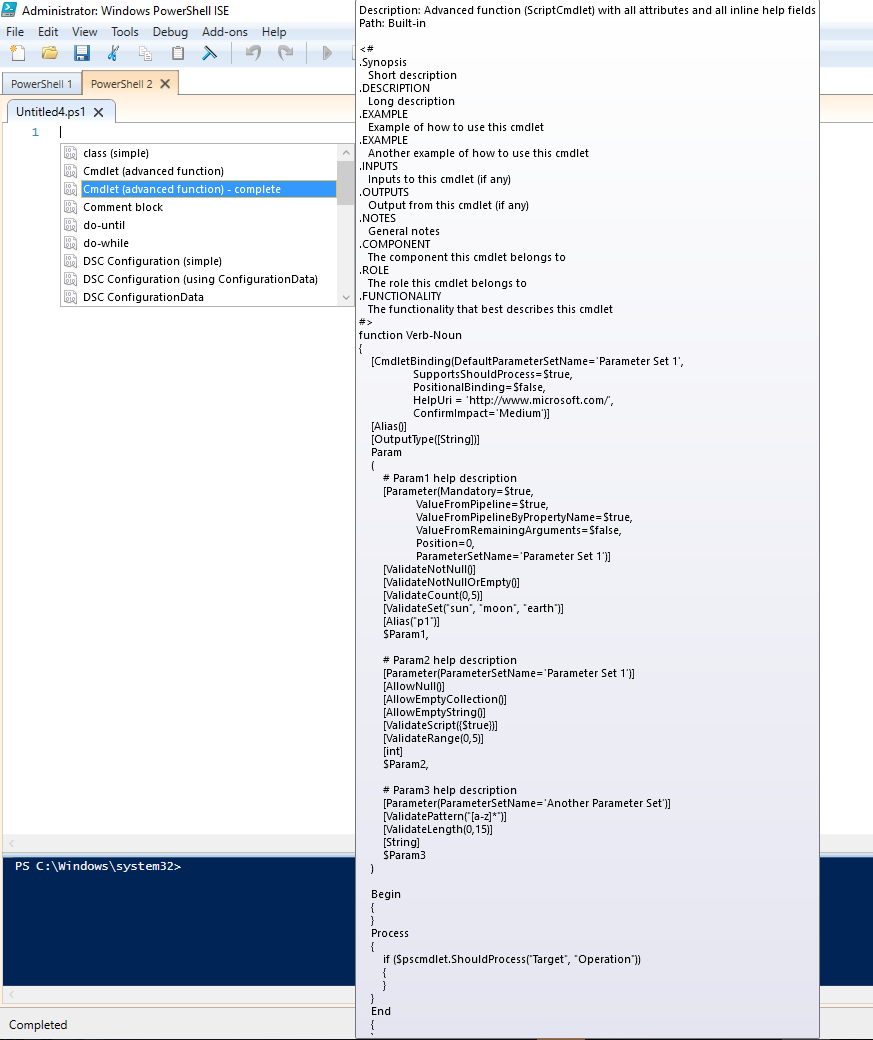
We start of by opening up PowerShell ISE and using our handy “Snippet” shortcut:

PowerShell_ISE_CTRL_+_J

We select the “Cmdlet (Advanced function) - complete” option in the “Snippet” context menu.  Once we have our advanced function template, we then proceed by entering a name for our Qualys Asset Group function.

Continue reading
Older posts Newer posts